

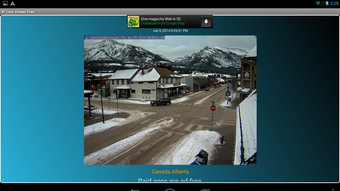
Description
Free IP Camera Monitoring for Android
Is IP Cam Viewer Free compatible with all Android devices?
The developer did not specify compatibility details beyond Android as the supported platform. Users should ensure their device meets minimum Android requirements for app installation.
Is the app safe to download and use?
IP Cam Viewer Free is available on the Google Play Store, which provides a layer of security through app vetting. The developer claims the app does not collect user data, but users should always review permissions during installation.
Does the app require an internet connection?
Yes, an active internet connection is required to stream video from remote webcams. The app relies on network access to receive live video feeds from IP cameras and webcams.
Can I use IP Cam Viewer Free offline?
The app does not support offline functionality. All video monitoring features depend on real-time streaming from connected webcams, which requires an active network connection.
What kind of license does IP Cam Viewer Free have?
The app is distributed as free software with no cost for use. The developer does not specify a formal license type, but the free distribution model indicates it is intended for personal and non-commercial use.
Overview
IP Cam Viewer Free is a dedicated video monitoring application designed for Android devices, enabling users to access and view live video streams from webcams and IP cameras. The app’s primary purpose is to provide real-time visual monitoring across multiple locations, making it suitable for home security, remote site observation, or personal curiosity about global webcam feeds. It is developed by seniorlabde and available through the Google Play Store, ensuring a standardized distribution channel.
Target users include individuals interested in remote surveillance, travelers who want to check live views from destinations, or hobbyists exploring public and private camera feeds. The app supports an unlimited number of camera connections, which enhances its flexibility for users managing multiple monitoring points. Real-world usage scenarios range from checking on a home environment while away to exploring global landmarks through public webcams.
The developer emphasizes privacy by stating the app does not collect user data, which adds a layer of trust for privacy-conscious users. Additionally, the app includes a feedback mechanism that encourages users to report issues instead of leaving negative reviews, promoting constructive improvement. The developer has also indicated plans to support URLs with refresh rates up to five images per second in future updates, signaling ongoing development.
Key Features & Capabilities
- Live Video Streaming – Access real-time video feeds from webcams and IP cameras via URL inputs. Ideal for remote monitoring and live observation.
- Unlimited Camera Support – Connect and manage an unlimited number of camera sources, allowing for comprehensive monitoring setups.
- Simple Setup Interface – Includes an editing function to configure the first webcam, reducing initial setup complexity.
- User Feedback Integration – Provides a direct channel for users to report issues or suggest improvements, fostering community-driven development.
- Privacy-Focused Design – The developer claims no data collection, appealing to users concerned about digital privacy.
These features support practical workflows such as setting up a home security network, monitoring vacation rentals, or exploring public webcam feeds from around the world. The ability to add multiple camera sources without restriction makes it ideal for users who need scalable monitoring solutions. The editing function helps beginners configure their first camera quickly, while the feedback system encourages transparency and long-term usability.
User Interface, Workflow & Performance
The app features a clean, minimal interface optimized for mobile devices, with intuitive navigation for adding, viewing, and managing camera streams. Users can access camera feeds through a list or grid layout, depending on screen size and personal preference. The workflow is straightforward: add a camera URL, configure settings, and begin viewing live video.
Navigation is consistent across screens, with clearly labeled buttons and minimal onboarding. The app’s performance is expected to be stable for standard video streaming tasks, though exact resource usage details were not specified. The developer did not provide information on CPU or RAM consumption, so performance may vary based on device hardware and network conditions.
Stability is likely maintained through regular updates, as the developer has shown responsiveness to user feedback. However, performance observations are based on general software behavior patterns, as no benchmark data was provided. The app is designed to handle live video streams efficiently, but actual smoothness depends on internet speed and camera feed quality.
Compatibility & System Requirements
IP Cam Viewer Free is designed for Android devices and is available in version 1.2.1 with a file size of 10.2 MB. The app is distributed through the Google Play Store, ensuring compatibility with most modern Android smartphones and tablets.
Exact system requirements were not listed by the developer. Users should verify that their device meets the minimum Android version required for Play Store installation. The app’s lightweight size suggests it is optimized for devices with limited storage, but specific hardware requirements such as processor speed or RAM were not provided.
Installation is straightforward, with the app requiring minimal storage space. Compatibility information is limited to the Android platform, and no details were shared about support for other operating systems or device types.
Pros and Cons
Pros
- Free to use with no hidden costs
- Supports an unlimited number of camera connections
- Simple setup process with editing tools for initial configuration
- Privacy-focused with no data collection claims
- Available on the Google Play Store for secure distribution
Cons
- No official information on system requirements or hardware specifications
- Performance details such as CPU/RAM usage were not disclosed
- Offline functionality is not supported
- App functionality is limited to Android devices
- Advanced features are reserved for the pro version
Final Thoughts + CTA
IP Cam Viewer Free delivers a practical, privacy-conscious solution for users seeking to monitor live video streams from webcams and IP cameras. Its ability to handle an unlimited number of feeds, combined with a user-friendly interface and no data collection, makes it a compelling choice for both casual and dedicated monitoring needs.
While the app lacks detailed technical specifications and is limited to Android, its core functionality is solid and well-executed. The developer’s openness to feedback and plans for future enhancements indicate a commitment to continuous improvement.
For anyone looking to explore live webcam feeds or set up a basic remote monitoring system, IP Cam Viewer Free offers a reliable, free tool that balances simplicity and functionality. Download IP Cam Viewer Free now.
Guides & Tutorials for IP Cam Viewer Free APK
How to install IP Cam Viewer Free APK
- Click the Preview / Download button above.
- Once redirected, accept the terms and click Install.
- Wait for the IP Cam Viewer Free APK download to finish on your device.
How to use IP Cam Viewer Free APK
This software is primarily used for its core features described above. Open the app after installation to explore its capabilities.
User Reviews for IP Cam Viewer Free APK 0
No reviews found





